09/06
09:00

Zombies in the Dark

8

Project Description

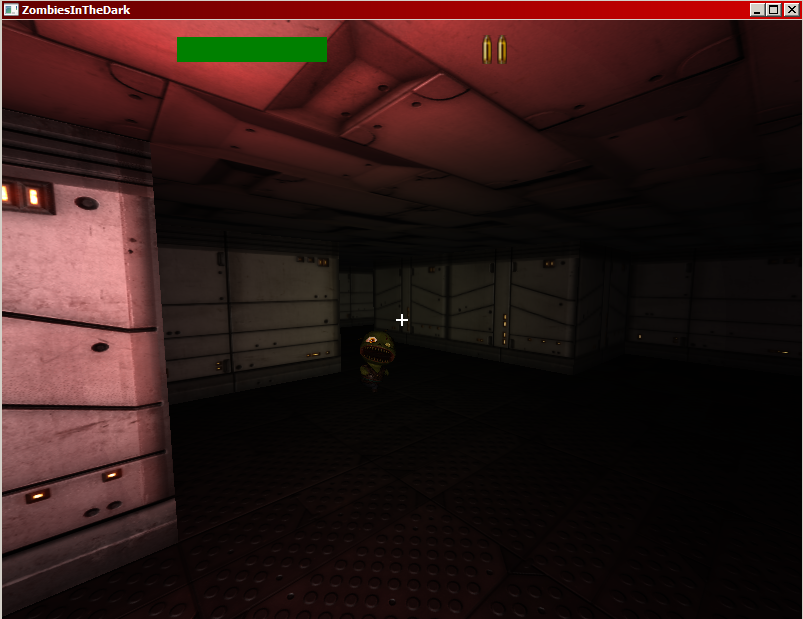
Long story short: First person shooter/sneaker. It's dark, and there are zombies!
Long story a bit longer: You have been dropped into a complex of dark hallways armed with just a gun and a couple of bullets and a flashlight. Try to dodge monsters along the way and make it to the exit. Thread lightly and use your flashlight sparingly. Monsters will see your light and will hear your footsteps when you run. Avoid close contact if you do not like to be bitten to death!

Team members


Installation Instructions

Created using Panda3D engine (www.panda3d.org).To play in browser you will need Panda3D runtime plugin: http://www.panda3d.org/download.php?runtime. Browser plugin works for Windows, MacOS and most popular Linux versions.

You can also download and play standalone exe file for Windows, which will require working internet connection to be able to download specific Panda3D runtimes the first time you start it.


8


PLAY (links!)


POST 7DFPS VERSION UPDATES


PLAY (POST 7DFPS links!)


Leave feedback

Your email address will not be published. Required fields are marked *

*

You may use these HTML tags and attributes: <a href="" title=""> <abbr title=""> <acronym title=""> <b> <blockquote cite=""> <cite> <code> <del datetime=""> <em> <i> <q cite=""> <strike> <strong>


All posts for this entry

16/06
15:56

Zombie recap

7 days later and we’ve managed to produce a finished playable, winnable (and most definitely losable!) game! I must say it’s been fun trying to implement all of the things that make up a first person shooter game.

Final game mechanics are as follows:

Use standard WASD keys to move, SPACE to run, left mouse button to shoot, right mouse button to toggle flashlight on/off. The goal of the game is to make your way through dimly lit corridors to the exit portal (rainbow colored box).

Or is it double rainbow?

Doing just that would be pretty easy, even if you are without a map or a compass and have pretty much no clue to your whereabouts. However, corridors are filled with monsters craving your flesh. So you need to do your best to sneak or outrun them, because you start with only 4 bullets in your gun in one hand, and a flashlight in the other.

When this happens, it's probably already too late


Zombies react to sounds and your distance: they can sense you if you get really really close to them, they can hear you if you walk really close to them, they can hear you if you run near them, and if you shoot your gun they will hear you over long distance. Also, if you turn your lamp on, they can see you as well.

Some tips:

Shooting zombies in the head deals significantly more damage than shooting them in their bodies. You are able to outrun them, but try not to run into bigger trouble. If a zombie is in front of you, but has his back turned towards you, when you turn your lamp on he will start to chase the shine of your lamp on the wall (this is internally called herding). Something like a cat following laser pointer. Use it to keep him turned away from you.

Or just shoot them till they fall

That is pretty much it, hope you enjoy our little game (which is available to play HERE ).

Feel free to send us comments here or on our twitter @loshdev.


1

15/06
20:45

Zombies are now really done!

Managed to do some last minute debugging and optimizations on collision detection which doubled our frame counter. Latest version (and most likely final) is deployed on the server. Check it out here: http://loshdev.com/zitd/

0

15/06
14:19

Zombies are done!

After a long frantic (well, not really :) ) week Zombies in the Dark is done. We have not succeeded in cramming all of the stuff we wanted to in there, but it’s solid, bug-free (fingers crossed) and playable. Links for download, play in browser and source code repo have been updated so happy playing, and please tell us what you think.

We will post a bit longer recap devlog post about our experience, as well as gameplay video, in a little while.

This was a really fun experience, and if this has tought us one thing, it is how to successfully finish a project! Looking forward to playing all the other great ideas that emerge from this.

0

11/06
08:26

Zombies in the Dark – The making of game UI

Devblog post by Vjeko:

Okay, so I started working on the user interface for our 7DFPS submission “Zombies in the Dark”. The game is written in python using Panda3D engine, and gui is made using libRocket middleware.

libRocket uses RML and RCSS files for GUI definition. The syntax very similar to HTML/CSS and it even supports inline python. In this project I’m going to keep the GUI definition separated from the code, so in my RML/RCSS files I’m only going to define DIV elements and their styles, and all other handling I’m going to do from the game code.

I’m starting with the main menu. It should contain only game title and two buttons, “Start Game” and “Exit Game”. In the game code I’ll have to implement event handlers which will handle transitions within the main game FSM. This part is very straightforward and this is the final result:

Main menu

Next stop is in-game UI which should be made of 3 elements: health bar, compass and ammo. Compass will be made using Panda3D as a 3D model, so I’m just going to leave some space on the screen for it. To make my life easier when arranging DIVs which will contain UI elements, I’ll use different colors to paint them. This is the first step:

Game UI part 1

As you can see I have 5 DIVs. Blue one is used to define the top of the screen, and it contains the yellow one which is centered. The yellow DIV should contain the final elements. Orange DIV is for health bar, red DIV is where the compass should be and it’s empty, and the green DIV will contain the ammo. I forgot to float the final elements to the left, and after an intervention in the RCSS file this is what I got:

Game UI part 2

I’m happy with the arrangement and it’s time to close the deal! For the health bar I will use two DIVs. First one will be 150px wide and 25px high and it will be colored red, and the second one will be defined inside the first one and it’s color will be green. It’s height will also be 25px, and it’s width will be controlled from the game code.

For the ammo I’m going to use pictures of bullets which I’ll insert into RML directly from the game code. The final result is this

Game UI part 3

I’m not really happy with the blurred bullets, but I’m going to have to live with it for now.

All that’s left to do is a menu which is shown when the game is paused. It should contain 3 buttons: “Resume Game”, “Back to Main” and “Exit Game”. The RML definition of this menu is easy, but the implementation required some interventions in the game code. I had to manage a new FSM transition and manage attaching and detaching key events. The final result is this:

Pause UI

And there you go! Fully functional three state UI in one day. :)

0

11/06
08:14

Zombies on the way!

Imagine being completely alone, in an unknown dark hallway, having nothing on yourself but a flashlight and a gun with 6 bullets. You wander a bit around sinister looking corridors, not finding anything. Then you hear a sound in the distance…it is low and grumbling, but you can just make out the word….brains…..braaaains. So you think to yourself: “Yap, I’m in a dark hallway filled with zombies armed with not more than a peashooter.”

Zombies in the dark is straight-to-the-point titled first person shooter/sneaker. You need to crawl through unknown hallways and find the exit, all the way dodging (or shooting if you have bullets left) brain-crawing mindless zombies. We are aiming to create a fun and atmospheric game for those times when you really need to be scared to your bones!

We will be adding new posts and screenshots and maybe some in-game video footage here so check back often!

0